
Manga Translator - IsManga
IsMangaComics
3.19.00 Reviews
- Version
- 1.0.101
- Installs
- 50.00K
- Age Rating
- Everyone
Screenshots
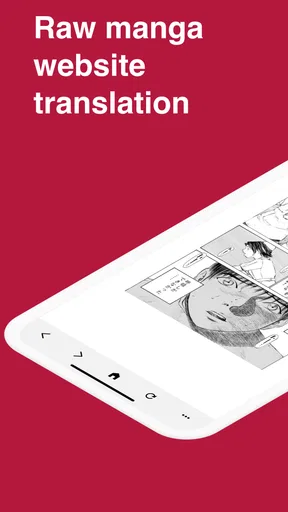
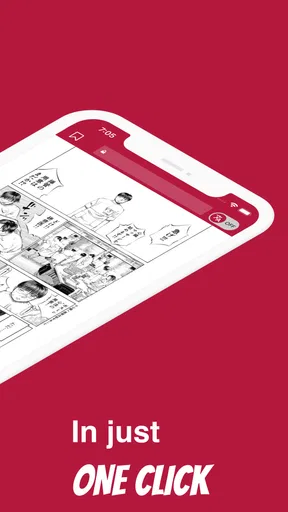
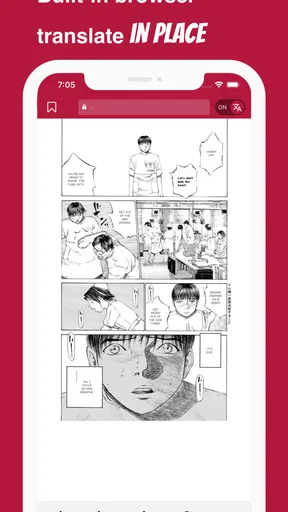
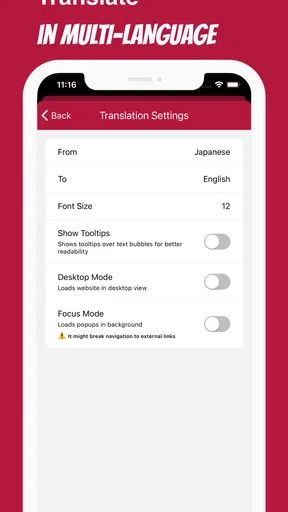
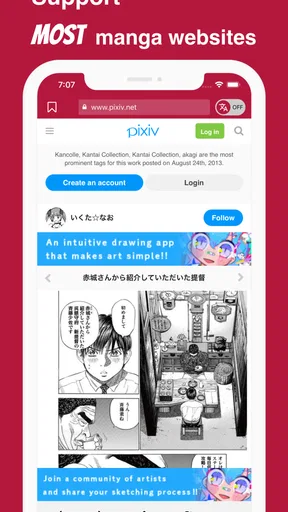

Our Review of Manga Translator - IsManga
 Analysis by Appyee
I think the idea behind Manga Translator - IsManga is genuinely useful: it lets me approach manga that would otherwise be difficult to follow because I cannot read the original language. That makes it an appealing option for curious readers, especially when I want to sample a page or make sense of a scene without waiting for a familiar translation. I would treat it as a reading aid, though, rather than a replacement for a carefully edited edition. The difference matters when a story depends on wordplay, voice, or tiny lettering.
A quick way to explore unfamiliar pages
In everyday use, the most practical question is not whether a translation appears, but whether it helps me keep reading without breaking the flow. A browser-based translation approach is well suited to checking a raw page in context: I can look at the art, follow the dialogue, then move on instead of copying every speech bubble into a separate tool. That convenience is most valuable for short reading sessions, browsing a chapter, or deciding whether an unfamiliar series is worth pursuing.
For example, imagine I have a few minutes during a commute and come across a page I cannot read. I can use the app to get a rough understanding of the exchange, then revisit the same scene later if the translation seems unclear. I would not rely on that quick pass to settle an important plot point. A joke, name, or line with several possible meanings may need more context than one isolated bubble can provide.
What translation can—and cannot—settle
Machine translation has a particular trade-off in comics: the text is short, but the surrounding clues are visual and often essential. A character’s expression or the sequence of panels can help me infer intent, while a clipped phrase can still be misread if the text recognition misses a mark or the source language leaves something implied. I find the best approach is to treat the result as a helpful reading cue, not an authoritative script.
When a line looks strange, I would first check whether the original lettering is clear and whether the bubble contains more than one line or an unusual sound effect. If the wording still feels off, comparing it with the neighboring panels can reveal whether the translation has lost a subject, a joke, or a shift in tone. This small habit makes the tool more useful without pretending it can resolve every ambiguity on its own.
Where it fits among manga-reading options
Compared with a conventional manga reader, this app’s distinctive purpose is working across language barriers rather than organizing a library or presenting a polished licensed edition. A reader who already has a translation they trust will usually have a smoother experience with that edition: the lettering and phrasing have been prepared for reading, and the story does not depend on live recognition. IsManga makes more sense when the page itself is the obstacle and I want help understanding it directly.
It also fills a different role from translating a screenshot or copying text into a general-purpose translator. Those workarounds can be useful, but they often add steps: capture the page, switch apps, select or type the text, then return to the artwork. A manga-focused browser can make that process feel more immediate. The trade-off is that I should still expect occasional recognition or phrasing problems, especially on dense pages where several small bubbles compete for attention.
What’s the Buzz About?
First off, Manga Translator - IsManga is designed to make manga reading accessible to a global audience. It's tailored for both Android and iOS, ensuring that no one feels left out. The app uses advanced OCR (Optical Character Recognition) technology to scan text from manga pages and then translates it into your preferred language. Pretty neat, right?
On opening the app, you’re greeted with a straightforward interface. There’s no fuss, just a simple and clean layout. You can upload images from your gallery or snap a photo directly within the app. The translation process is fast, and before you know it, those mysterious characters turn into readable text. It almost feels like magic!
How It Works
Using IsManga is as easy as pie. Once you have your manga page ready, you can either upload it or take a live picture. The app then works its magic by identifying the text and providing you with a translation. The translations appear seamlessly over the original text, maintaining the aesthetic of the manga.
One of the things I love about this app is its adaptability. It supports multiple languages, so whether you’re translating from Japanese to English or even French to Spanish, IsManga has got you covered. Plus, the accuracy of the translations is impressive, often capturing the nuances that are crucial for manga storytelling.
Getting the Most Out of IsManga
The app comes with some handy features that enhance the user experience. For instance, you can adjust the brightness and contrast of the images to ensure the text is clear and readable. There’s also an option to save your translated pages for offline reading, which is perfect for those long commutes or when you’re off the grid.
But wait, there’s more! The developers have included a community feature where users can share fan translations and discuss them with fellow manga enthusiasts. This not only fosters a sense of community but also helps improve the translations through collaborative efforts.
My Experience with IsManga
Having used the app for a few weeks, I can confidently say it’s a game-changer for manga fans like myself. One of the highlights for me was being able to read some of the lesser-known mangas that haven’t been officially translated yet. It’s like unlocking a treasure trove of stories that were previously out of reach.
However, it’s not all sunshine and rainbows. While the app performs admirably most of the time, there are occasional hiccups, especially with complex character fonts or heavily stylized text. But, considering the sheer amount of text it handles, these instances are rare and usually resolved with a quick adjustment or two.
Choosing it for the right reason
My recommendation depends on what you expect from a comics app. IsManga is a better fit for someone who already has raw pages to inspect than for someone looking for a catalog of licensed series, a reading queue, or a polished digital comic shelf. Its value is the translation step, not the discovery or collection experience. If your main goal is simply to read a professionally localized volume, I would choose that edition instead.
It may also suit language learners who want a visual prompt while studying, but I would use it selectively. A translated overlay can help me understand a scene, while the original lettering remains a useful reference; for serious study, I would still check a dictionary or trusted language resource rather than memorize a machine-rendered sentence as a model of natural speech. Comics use slang, sound effects, and compressed dialogue, so the context is part of the lesson.
A few practical habits make a difference
When recognition struggles, I would start with the simplest fix: use a clear, straight-on page image and make the lettering as legible as possible before judging the translation. A tilted photo, glare, a dark scan, or tiny text can make the source harder to identify. If a page has several dense panels, working through one page at a time is more manageable than trying to interpret a whole chapter in one go. This is a practical trade-off: slower than reading a finished edition, but easier to check panel by panel.
Brightness and contrast adjustments are worth trying before giving up on a difficult page, particularly when the original is faint or the background is busy. I would avoid changing the image so aggressively that fine strokes disappear; a cleaner-looking page is not always a more readable one. If the translation still seems nonsensical after a visual adjustment, I would treat that as a sign to verify the scene elsewhere rather than repeatedly tweaking the same image.
For continuity, I would keep track of where I stopped outside the translation itself—for example, by noting a chapter and page in my own reading list. That is especially useful when I am sampling an untranslated series across several short sessions. A translated page can answer an immediate question, but it is not the same thing as a complete library workflow, so a simple personal note can prevent me from losing the thread.
Who should look elsewhere
I would skip this app if I need publication-quality wording, dependable handling of every stylized sound effect, or a translation that can be trusted without checking the panel around it. It is also not my first choice for a reader who wants to browse a curated collection and start reading immediately; a conventional comics service is better suited to that. The same applies when an official translation is available and accuracy, lettering, and consistent character names matter more than getting a quick sense of the raw page.
There is also a difference between understanding the gist and following a nuanced conversation. If a scene turns on sarcasm, honorifics, a pun, or a character’s distinctive way of speaking, I would be cautious about treating a machine translation as the final word. I may still use it to get oriented, then compare the scene with a reliable translation or ask someone fluent in the source language. That extra check is not a failure of the app; it is simply the sensible limit of automated interpretation.
Cost, availability, and expectations
The app is free to install, with in-app purchases listed at $6.99 per item. I would try the basic experience against the kind of pages I actually read before deciding whether any paid item is worthwhile. The free entry point makes it easy to judge whether its workflow suits me, but I would not assume that every capability is included without checking the purchase details shown in the app.
For Android users, the listed minimum system requirement is Android 7.0, and the current release is version 1.0.93. The app is rated for Everyone, which describes its store age classification rather than guaranteeing that every manga page a person chooses to translate is appropriate for every reader. IsManga is made by IsManga, and its 50K+ installs show that it has found an audience among people looking for this particular kind of translation help.
Its average rating is 3.1 from 311 ratings, alongside 9 written reviews. I read that as a reason to approach it with realistic expectations: the idea has a clear use, but individual results can depend heavily on the page, lettering, and language pair. I would test it on a page whose content I can partly understand already, so I can judge whether the recognition and phrasing are helpful before relying on it for a story I cannot follow at all.
The Verdict
All in all, Manga Translator - IsManga is a fantastic tool for manga lovers who want to explore beyond the boundaries of language. Its user-friendly interface, accurate translations, and community features make it a must-have for any manga enthusiast’s arsenal.
If you’re like me and constantly on the hunt for new manga adventures, give this app a try. You might just find yourself lost in a story you never thought you’d be able to read. Happy translating!
Verdict
Strengths of Manga Translator - IsManga
- Accurate text translation for multiple languages.
- Simple and intuitive user interface.
- Fast processing of manga pages.
- Supports various image formats.
- Offline translation capabilities.
Limitations of Manga Translator - IsManga
- Limited free translations per day.
- Occasional text misalignment issues.
- Requires high-quality images for best results.
- Ads can be intrusive in free version.
- No cloud storage for translated files.
Similar Picks in This Category
View All
WEBTOON: Manga, Comics, Manhwa
NAVER WEBTOON4.6

MangaToon: Comic & Manga
MangaToon4.3

네이버 웹툰 - Naver Webtoon
NAVER WEBTOON4.3

Tapas – Comics and Novels
Tapas Entertainment Inc.4.2

Lezhin Comics - Daily Releases
LEZHIN ENTERTAINMENT3.3

WebComics - Webtoon & Manga
WEBCOMICS HOLDINGS HK LIMITED4.4
Frequently Asked Questions
What is Manga Translator - IsManga and how does it work?
Manga Translator - IsManga is an app designed to help users translate manga text into different languages. It utilizes advanced OCR (Optical Character Recognition) technology to scan manga pages and convert the text into editable and translatable formats. Users simply need to upload an image or take a photo of the manga, and the app provides real-time translations.
Is Manga Translator - IsManga free to use, or does it require a subscription?
Manga Translator - IsManga offers both free and premium features. The basic version allows users to translate a limited number of pages per day. For unlimited translations and additional features like ad-free usage and enhanced translation accuracy, users can opt for a subscription plan, which provides a more seamless experience.
Which languages are supported by Manga Translator - IsManga?
Manga Translator - IsManga supports a wide range of languages, including English, Japanese, Korean, Chinese, Spanish, French, and more. The app continuously updates its language database to include more languages, ensuring users can enjoy manga from different cultures and regions without language barriers.
How accurate are the translations provided by Manga Translator - IsManga?
The accuracy of translations in Manga Translator - IsManga is generally high, thanks to its use of AI and machine learning algorithms. However, the quality may vary depending on the complexity of the text and the clarity of the manga image. For the best results, users should ensure the manga page is well-lit and clear.
What devices are compatible with Manga Translator - IsManga?
Manga Translator - IsManga is available for both Android and iOS devices. It requires a minimum operating system version to function smoothly, typically Android 5.0 and above or iOS 11.0 and above. Users can download the app from the Google Play Store or Apple App Store, depending on their device.
